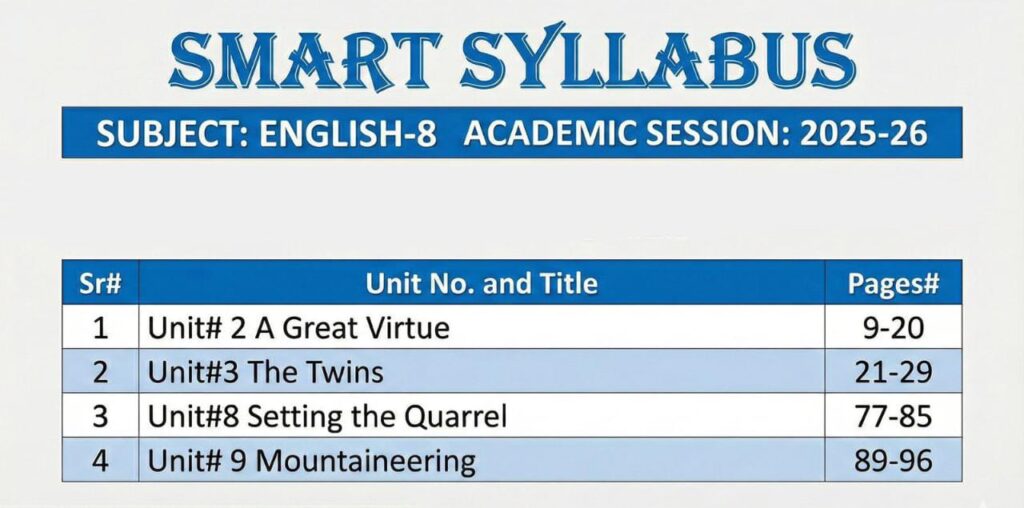
8th Class English Smart Syllabus For All Punjab Boards (Session 2025-26)
8th Class English Smart Syllabus For All Punjab Boards (Session 2025-26)
Are you preparing for the Middle Standard Examination and looking for the latest coursework? The 8th Class English Smart Syllabus For All Punjab Boards (Session 2025-26) is your essential roadmap to securing high grades this year.
The Punjab Curriculum and Textbook Board (PCTB) has streamlined the academic content to focus on core learning outcomes. This guide covers the complete breakdown of chapters, essential grammar topics, and essay writing requirements. Whether you are a student or a teacher, knowing exactly what to study is the key to success.
Overview of Punjab Board 8th Grade English Syllabus
The English syllabus for Class 8 aims to enhance reading comprehension and writing skills. Adhering to the “Smart Syllabus” ensures you don’t waste time on excluded chapters. This syllabus is valid for all Boards of Intermediate and Secondary Education (BISE) in Punjab.
Detailed Chapter Breakdown (Session 2025-26)
Below is the specific distribution of chapters included in the 8th Class English Smart Syllabus For All Punjab Boards (Session 2025-26). Mark these in your textbook now.
| No. | Unit Name | Included Topics & Grammar |
|---|---|---|
| 1 | Tolerance of the Rasool (SAW) | Reading, Glossary, Nouns, Punctuation marks. |
| 2 | A Dialogue (Traffic Rules) | Dialogue writing, Present Indefinite Tense. |
| 3 | Chitral Valley | Comprehension, Adjectives, Prepositions. |
| 4 | Poems (Selected) | Summary writing, Stanza comprehension, Similes. |
| 5 | Magic Show | Questions/Answers, Active & Passive Voice (Intro). |
Grammar and Composition Requirements
To top the exams, you must master the objective and subjective grammar portions. The smart syllabus highlights specific areas for the 2025-26 session:
- Important Essays: My School, Quaid-e-Azam, A Hockey Match, Morning Walk.
- Letters: Letter to father asking for money, Letter to friend inviting for birthday.
- Applications: Application for Sick Leave, Application for Fee Concession.
- Tenses: Present, Past, and Future (Indefinite and Continuous).
- Translation: 100 Standard Urdu to English Sentences.
Pro Tips to Score High
- Focus on Glossary: Memorize synonyms and antonyms from the end of each chapter.
- Practice Handwriting: Neat presentation in the subjective section boosts marks.
- Solve Past Papers: Review the last 5 years of PEC papers.
For official notifications and updates, always refer to the Punjab Curriculum and Textbook Board website.
Frequently Asked Questions (FAQs)
Conclusion
Success in the Middle Standard Exams starts with smart preparation. By following the 8th Class English Smart Syllabus For All Punjab Boards (Session 2025-26), you can focus your energy on the topics that matter most. Ensure you revise the grammar rules and practice writing essays weekly. We wish you the best of luck with your exams!